Showing posts with label Chris. Show all posts

Friday, 4 November 2011

Evaluation of wire frames

Evaluation of wire frames/ mockups
We wanted to to turn our paper wire frames into more realistic mockups, so we went away and used programs such as Photoshop or Balsmiq mark ups to generate a layout and overall theme for our site. This was also a good opportunity to try out any colour schemes.

If we look at all the designs as a whole we can see we have incorporated a 'modular' type look.
The reason why we choose this style is:
  • A visually pleasing and logical layout.
  • For mobile devices we can use css that will accommodate the smaller screen size. So for example instead of being fixed across a large screen area, the elements or modules will stack on each other. This system would favor both desktop monitors and mobile devices.
  • This style should also translate well across the different internet browsers. 
Colour
Our web page's theme will hopefully be "super clean". Basically a page witch is simple but elegant. The colours we use will reflect this. We have used tools such as adobe "kuler", this helps us pick colours witch complement each other. Simple light to dark blues will help give the modules that "layer" look while keeping it simple.

Spec allocation Progess


Concept and context - 20%
Site layout and design - 20%
Backend design - 40%
Advanced issues - 20%

------------ 25 % of module grade ------------ 

Just an area were we can see what we have done! If there's anything missing then please add.


What we have done

x Consideration of Copy Right issues
x PHP wall
x Logo Design Process + explanation
x Site Plans
x Cookies
x Wire-frame explanation

x Database Design
x Concept
x Pros/Cons of Cloud
x Session
x HTML5/CSS3
x Name Ideas
x Brainstorm/original ideas
x Encryption


I think we have covered all the bases.

Cookies

Cookies
A cookie is used to return a users browser to some sort of previous state. For example remembering a user-name so the user doesn't have to retype it. Also know as HTTP cookie/browser cookie, it makes for a better user experience. Cookies are simply a string of characters no larger than 4kb. The most important variables to a cookie are max-age, path and domain. Which are self explanatory.

Why use them in our project?
For our project we intend to use "sessions", a session cookie will only last for the duration that the user is on the page. As soon as the page is closed the cookie will expire. We will also use them to remember user names and possible passwords.

How do we use them?
Creating a cookie is relatively simple process. In the html file we can use java script functions to remember the user's name. In this example http://www.echoecho.com/samplecookie1.htm the user will enter the name once and the code will remember them the next time they visit the page. The name is simple saved into a var and returned the next time they visit. We could implement this script into our project for the user name so you wouldn't have to retype it. This example also shows a function that gets rid of the cookie. This would be useful if the user was on a public computer and didn't want to share their details.


Site Plans

What is a site plan?
A site plan is simply a visual representation of how the website will flow from page to page. This will help us to plan how we build the site and contemplate logically any additions we want to make.

Ours

Explanation
As you can see our splash page will be the first thing the users will encounter  when entering our site. They will have the option to either log-in if they have previously registered or register for a new account. The new user will have to enter their personal details and upload an avatar. They will then navigate to the main page were they can see all their contacts and view the groups "wall" or "shout box". Users that have already will jump to this page. From here you will also be able to invite others to join your group.

Wednesday, 2 November 2011

Logo Design (As a process)

Logo Design Process

The hardest part of the design process was choosing a name as it would dictate the majority of the design decisions. We came to Cloud Fish and liked it. From there we were able to imagine the type of logo we wanted. The group decided that the integration of some sort of cloud and a fish would render a unique logo idea. This theme of clouds and fish could appear over the website.

What we wanted to convey
We wanted a light heated and friendly logo that would be suitable for family eyes. The concept of cloud storage (address book on the web) is represented by the cloud and the 'hook' is the fish. This could convey a sense of a school of fish (lots of members).


Here is the Group pool of logo ideas. Note we are using the first.

-------------------------------------------------------------------------------------------

How can we improve on our chosen logo?
The logo in it's current form is very basic and lacks detail. We will consider maybe adding lines in the cloud or maybe to stick with the theme of an address book, little notes/address books.

PHP Wall

What is a wall?
A wall is basically like a message board where member's of the site can post serqenally post comments in order of time. Also referred to as 1,2 and 3 sites that utilize this feature are generally a richer experience for users. It's also fair to comment that this is a web2.0 feature.

Pros
  • Adds functionality to the site
  • Richer social experience for users

Cons
  • Can be abused (bullying and 'trolling*') 
  • We will have to use script to remove any html tags such as iframes so users cannot damage the site's appearance
  • Swearing on some forums and message boards is strictly forbidden. We will decide if we want to include such a feature
  • Spamming
  • Double posting (accidental)

How we will use ours
As you can see from our mockups, it's our intentional to have a module style wall on the right hand side of the page. This will hopefully give the impression of a site that has a strong social element. A site where you can look up your family and friends details and post quick messages that everyone in that group can see. Each user's post will also have their avatar next to it so members can see each other.

We could also include a emoticon  feature that lets users use 'smilies' on the wall. This would mean we would have to have a data bank of emoticon's and script that scanned and replace something like :) with the small picture file.

We will stop anyone from using html tags such as iframes from threatening the integrity of the page. We will also look into rules governing how often people can post to the wall. To stop spamming and doubles posting.

Quick Code example
Using a worked example from http://www.nairaland.com/nigeria/topic-214623.0.html we were able to learn the basics about walls through php.
<?php
$text="<hr align='left'>".date("m:i:s ").$_REQUEST['text'];
$handle = fopen("wall.txt", "a");
fwrite($handle,$text);
fclose($handle);
echo $text;
?> 

 We then use simple script on the html page with functions that can call previous posts form a .txt file then post to the text file. We will also incorporate an avatar. We will create a new table with user IDs and a url to the photo that they uploaded. 


*Troll definition
"Forum trolls are users that repeatedly and deliberately breach the netiquette of an established online community, posting inflammatory, extraneous, or off-topic messages to bait or excite users into responding or to test the forum rules and policies, and with that the patience of the forum staff. Their provocative behavior may potentially start flame wars (see below) or other disturbances. Responding to a troll's provocations is commonly known as 'feeding the troll' and is generally discouraged, as it can encourage their disruptive behavior."

Sunday, 30 October 2011

Mock up

Early mockup, testing Colours from Kuler (Adobe)
#1A1F2B #30395C #4A6491 #85A5CC #D0E4F2


PLEASE ADD TO POOL (I cant edit your posts m8 ^^)


ANTI its up too you! Different styles will help us more - CHRIS

^^^^^^^^^^^^^^^^^^^^^^^^^^^^^^^^^^^^^^^^^^^^^


A consideration of Copy Right issues

A consideration of Copy Right issues in relation to Cloud Fish.

Images -
Fonts used -


Images
Any images we might use will be Creative Commons based.
http://creativecommons.org/licenses
This means in short that as long as we abide by the authors request (this maybe just to reference them somehow in the content) we can use the content created by them, tweek and even use the images for commercial use.

Fonts
A font will come with its own set of licensing rules. With the onset of HTML5, custom embedded fonts leaves developers open to copyright infringement in reference to the fonts they use.
A font by legal definition is regarded to be the same as software and hence taken very seriously. That is why we will be using free font websites.
http://www.fontsquirrel.com is a site that provides free commercial and non-commercial fonts with no strings attached.


"Look & feel"
A relatively new consideration, thanks to major lawsuit cases such as Apple suing Microsoft over the "look and feel" of Windows new operating system. This also transfers over to web pages.

We can safely sat that Cloud Fish is unique and isn't copying layout/colour schemes of other websites.

Wednesday, 12 October 2011

Tuesday, 11 October 2011

Deadlines & Brief

Overview
You are to specify, build and evaluate a small/medium sized application to run across the internet. The actual site you build is entirely your choice, so long as it is able to address the criteria appropriately, and guidance and feedback regarding your proposed ideas will be given during workshop sessions between weeks 3 and 7.

Element 2S: Specification of the proposed system worth 25% due week 7: Your specification should be sufficiently detailed to enable a prospective user or purchaser to select the application and for another programmer to be able implement the application. Include the following elements:

Concept and context - 20%
Site layout and design - 20%
Backend design - 40%
Advanced issues - 20%

The following elements are likely to form a significant part of a complete specification:

  • A strong concept. 
  • Evidence of research both technical and contextual. 
  • Evidence of consideration of alternative solutions. 
  • Evidence of consideration of feasibility. 
  • A complete site map. 
  • Two example input page mockups, two example output page mockups. 
  • Data specification (usually ER and EA diagrams). 
  • Specification of dynamic pages (inputs, purpose, validation). 
  • Consideration of development language and tools. 
  • Consideration of broad security issues. 
  • Consideration of copyright issues. 
Element 2A: Demonstration of the finished application worth 50% due week 14:

A functional prototype of your application is to be published live on an Internet server.

If any parts of the system are password protected you must clearly give the necessary password details in a file passwords.txt submitted via the Online File Submission. Keep a backup copy of your work (which works on Localhost).

Demonstration of application:

  • You are required to demonstrate your completed application in week 14. 
  • A schedule of demonstration times will be posted under Submission Details below. 
  • The demonstration is an integral part of the assessment process. 
  • Failure to demonstrate your application will result in a maximum mark of 49% 
  • The purpose of the demonstration is to: 
  • provide confirmation that the application is your own work 
  • allow you to respond to comments or questions about your work from the assessor 
  • explain any points about your work not otherwise covered 
You will be required to explain your work both in terms of a user's perspective and from a technical perspective.

Sunday, 9 October 2011

Names and Logo Ideas (Group Pool)

Note - All users use this space so we can keep everything together :)


Name Ideas for  (CLOUD FISH) !

  • tree dwellers
  • my family hub
  • family central
  • myFamily
  •  


Logo Ideas


(Chris)


Just thought i would play with the idea of mixing the two components of our site name. It's very rough but you get the idea.


I created another tow Logo..

Logo 

Wire Frames (Group Ideas Pool)

In this idea we start with a tear drop style. You begin at the top with "you" and have multiply branches. Similar to a family tree and would play on the theme of family which we would like to use.

To create a new set of contacts you would simply "add member" and rename the surname field.


(CONCEPT IDEA)


This image shows what a message board system could look like.

The board would be neatly at the bottom of the page out of the way of the main content. Avatars, messages and dates would be displayed.

(CONCEPT IDEA)


This is a copy of Craig's layout, just seeing if it would work with my logo idea.


This is is more of a traditional social media layout whereby the user would rarely need to navigate away from the main page once logged in. Details would be displayed dynamically below the form in the style of a more traditional contact book.

Splash Page/ Cookies/Table (Week 2 Ideas)

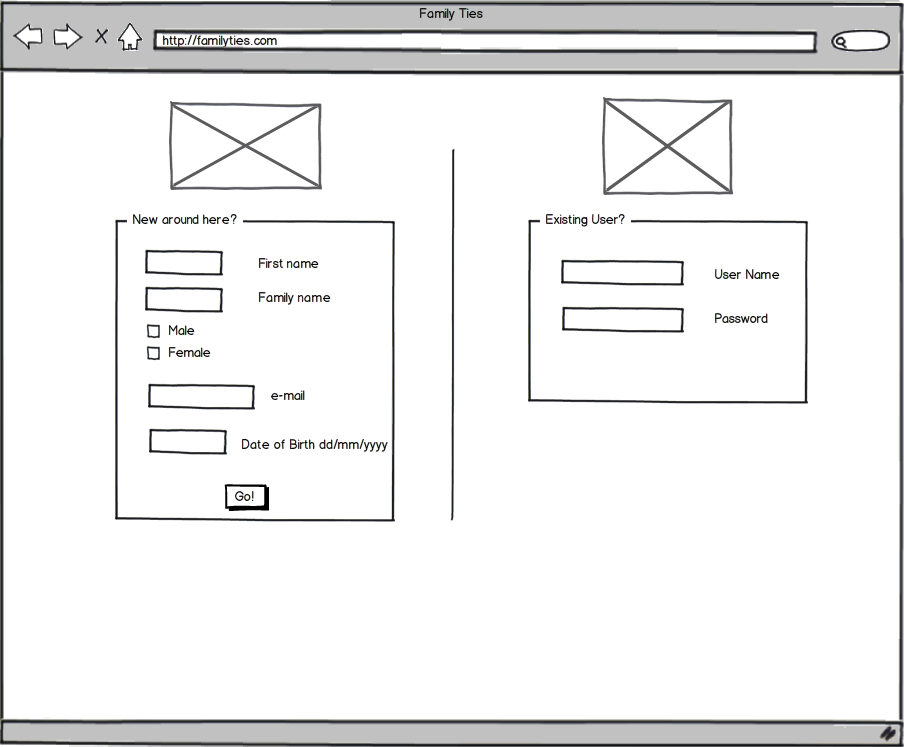
Splash page

With other examples of online address books and social media sites, its important to have a splash page were users can either sign up or log in to their existing profile.

To the right is a quick mock-up of a possible design for our splash page.

Cookies 

A cookie will be useful for users who wish to log back in, so they won't have to re-enter their details onto the website. So the minimum we will have is the user name and password cookie. We can set the password to display * 's instead of characters however encryption of the password is another subject of research. A good example of cookies in action is at http://www.cookiecentral.com/demomain.htm view page source to see how its called and used.


Tables  (for data base)


What we will need:

User ID -
First name
Secondname
DOB
Address
Telephone Number
Mobile Number
Photo
Family Tie

We will also be looking into encryption of this table.

PHP Wall

Using a work example from http://www.nairaland.com/nigeria/topic-214623.0.html I was able to upload my own PHP wall to zappa.
My example is here - http://zappa.uwl.ac.uk/~21108489/

The php
<?php
$text="<hr align='left'>".date("m:i:s ").$_REQUEST['text'];

$handle = fopen("wall.txt", "a");
fwrite($handle,$text);
fclose($handle);

echo $text;
?>

The functions for download and post are located in the html file. It should be quite easy to implement this into our website so the users can have a message board feature to the page.

Geo-location & Printing with HTML 5

Geo-location Example - http://merged.ca/iphone/html5-geolocation

This is a great example as it works on Firefox, Safari, Chrome and the iphone. It works by first calling JavaScript object navigator.geolocation. (Html5).

        if (navigator.geolocation)
        {
            navigator.geolocation.getCurrentPosition(
                 function (position) {  
                mapServiceProvider(position.coords.latitude,position.coords.longitude);    },

Next we need to declare our mapping server this is done by -
        function mapServiceProvider(latitude,longitude)
        {
            // querystring function from prettycode.org:
            // http://prettycode.org/2009/04/21/javascript-query-string/
        
            if (window.location.querystring['serviceProvider']=='Yahoo')
            {
                mapThisYahoo(latitude,longitude);
            }
            else
            {
                mapThisGoogle(latitude,longitude);
            }
        }

The provider could be most any search engine with mapping.

        // be sure to include the script to initialize Google or Yahoo! Maps
        function mapThisGoogle(latitude,longitude)
        {
            var mapCenter = new GLatLng(latitude,longitude);
            map = new GMap2(document.getElementById("map"));
            map.setCenter(mapCenter, 15);
            map.addOverlay(new GMarker(mapCenter));
        
            // Start up a new reverse geocoder for addresses?
            geocoder = new GClientGeocoder();
            geocoder.getLocations(latitude+','+longitude, addAddressToMap);
        }
Update>
We have decided not too use geo location in our project...

_________________________________________________________________________________

Printing in HTML5

Focus on having a CSS rules- setup for printing

 TBC


Wednesday, 28 September 2011

Research

As a group we have decided to spend the next week do some initial research into the following areas:

- Examples of online and offline applications used as address books.
- Advantages and disadvantages of 'cloud' storage.
- Technologies that we may need to implement within our application.
- What our features maybe and how they would work.
- Potential security issues.

Tuesday, 27 September 2011

Ideas

We have decided to develop the concept of an online address book.

The idea of the application would be to provide an address book that could be shared by, viewed and updated by members of an extended family.

Through secure a secure access point, family members would be able to share and update home addresses, phone numbers and email addresses. In practice this would be a very small, tightly controlled social media application.

This application would make it easy to get in touch with relatives who may live all over the world and not regularly stay in touch, and would mean that when a member updates their contact details all participating family members would know.

Initially we have come up with some categories for our database to contain:
- Names
- Phone Numbers
- Address
- Emergency Contact details
- Work numbers
- Thumbnail photo

We have also talked about the idea of having a message board that can be posted to by all family members, and that could be shared over social networking sites such as Facebook and Twitter.

One of the deciding factors in our group choosing to develop this idea is the recent trend toward 'cloud' storage of data and the benefits that this can bring.

Ideas

mindMap